Skip to content
WooNinjaWooNinja
  • Home
  • Thinkific
    • WooCommerce
    • Single Sign On (SSO)
    • Thinkific B2B Dashboard
    • WordPress Shortcodes
    • Groundhogg Automation
    • Learndash Migration Service
    • Uncanny Automator
    • WeChat & AliPay
    • Thinkific Funnels
  • Intercom
  • Groundhogg
    • Telegram Messenger
    • Simple Texting
    • WooCommerce Subscriptions
    • WooCommerce Bookings
    • WooCommerce Deposits
    • WooCommerce Memberships
    • Direct Mail & Thanks.io
    • Paid Membership Pro
    • Ultimate Member
    • Shopify
    • Restrict Content Pro
    • Thinkific
    • Mailgun
    • Hunter.io
    • Tawk.to
    • Passwordless Login
  • Contact
  • Buy Now
  • Login
Popular Search thinkificlearndashssovattax

B2B Dashboard

  • Can I view how long a student has viewed materials in Thinkific B2B?
  • Can I view reporting in the Thinkific B2B Dashboard?
  • How do I assign a student to a group in Thinkific B2B?
  • How do I bulk upload B2B users or students to Thinkific?
  • How do I add a B2B student in Thinkific?
  • How do I assign Courses & Bundles to Users and limit the number of students on their account?
  • How do I add B2B Users to Thinkific?
  • How do I make B2B sales with Thinkific?
  • How can I configure a User’s B2B settings in Thinkific?
  • System Settings for the Thinkific Dashboard
  • Thinkific B2B Webhooks
  • How to Tag Students in the Thinkific Dashboard
  • How to use the Thinkific B2B Dashboard
  • How do I sync existing students to a user in the Thinkific B2B dashboard?
  • How can I reset a Users password in Thinkific?
  • How can I log into the Thinkific B2B Dashboard without a password?
  • How do I set the default user permissions for the Thinkific Dashboard?
  • Thinkific B2B REST API
  • How to sell multiple seats in Thinkific using Stripe Checkout
  • How to sell course seats in bulk with Thinkific
  • How to add notes to students in Thinkific

Single Sign On (SSO)

  • How to Single Sign On (SSO) from Thinkific to WordPress
  • What happens if a student changes their email in Thinkific or WordPress?
  • Thinkific SSO Shortcode
  • Getting Started: Thinkific SSO & WordPress

WooCommerce Extension (Version 3.0 and Below)

  • Creating Thinkific Products in WooCommerce
  • Selling Multiple Seats / Coupons / Licenses on WooCommerce with Thinkific
  • How to offer an Alumni discount in Thinkific with WooCommerce
  • Shortcodes for Thinkific in the WooCommerce Extension
  • WooCommerce Extension for Thinkific – REST API
  • Selling a Thinkific Course or Bundle with WooCommerce
  • Getting Started – Connecting WooCommerce to Thinkific
  • What are the Order Actions?
  • How can I generate an express sign-in link for Thinkific?
  • How do I add a direct to checkout link to my email?
  • How can students access Thinkific from WooCommerce?

Hunter.io

  • Hunter.io Settings
  • Getting Started: Hunter.io

Mailgun

  • Mailgun Benchmarks & Settings
  • Mailgun Funnel Example
  • Getting Started: Mailgun & Groundhogg

Shopify

  • How do I import existing customers from Shopify into Groundhogg?
  • Shopify Funnel Example with Groundhogg
  • Getting Started: Shopify & Groundhogg

Tawk.to

  • Getting Started: Tawk.to

Telegram

  • Using Telegram Channels with Groundhogg
  • Sending Messages with Telegram from WordPress

Groundhogg Extension

  • Why is my student not enrolled?
  • Mandatory / Custom Fields In Thinkific
  • How to sell a Thinkific Course with WooCommerce & Groundhogg
  • Thinkific Benchmarks, Actions & Settings
  • Enrollments, Bundles & Course IDs
  • Example Thinkific Groundhogg Funnel
  • Getting Started: Thinkific & Groundhogg

WooCommerce Bookings

  • WooCommerce Bookings Funnel Example
  • WooCommerce Bookings Benchmarks
  • Getting Started: WooCommerce Bookings & Groundhogg

WooCommerce Deposits

  • WooCommerce Deposits Funnel Examples
  • Getting Started: WooCommerce Deposits

WooCommerce Memberships

  • WooCommerce Memberships & Groundhogg

WooCommerce Subscriptions

  • How to use WooCommerce Subscriptions with Thinkific
  • WooCommerce Subscriptions Funnel Example
  • WooCommerce Subscriptions Benchmarks
  • Getting Started: WooCommerce Subscriptions & Groundhogg

WordPress

  • Thinkific Vs WordPress LMS – Which is better?
  • Thinkific WordPress REST API
  • Thinkific WordPress Shortcodes
  • How do I use a cart with Thinkific? (WooCommerce)
  • How to sell eBooks with Thinkific & WordPress
  • Learndash & WordPress LMS
  • What can be migrated from WordPress to Thinkific?

Uncanny Automator

  • Uncanny Automator & Thinkific – Getting Started

Paid Memberships Pro

  • Can I add or remove membership in funnels?
  • Can I tag users by membership in funnels?
  • Getting Started: Paid Memberships Pro

Help & Support

  • I need help, what do you need to help me?
  • How do I add WooNinja to my WordPress site for debugging purposes?
  • How does WooNinja access my Thinkific Site?

Ultimate Member

  • Ultimate Member Funnel Examples
  • Getting Started: Ultimate Member

FAQ

  • Can I speed up my funnels, events and queue in Groundhogg?

WooNinja Funnels

  • Getting Started: Creating a new funnel for Thinkific
  • How can I delete a file from my Thinkific Funnel?
  • How do I add a file to my Thinkific Funnel?
  • When can I send a Thinkific Funnel?
  • What is the best Thinkific funnel trigger to use?
  • How do I cancel or delete my account?
  • How do I change the email my Thinkific funnels are sent from?
  • How can I view who has received my Thinkific emails?
  • What is the best email text to use for Thinkific Funnels?
  • How do I change the name or email my funnels are sending from?

WooNinja File Share

  • Getting Started: Sharing files and downloads with Thinkific
  • How do I delete a file or folder from Thinkific?
  • How do I rename a folder in Thinkific?
  • How do I control what files and folders a student has access to?
  • How do my students access my Thinkific file share?
  • How do I share files and folders with Thinkific Bundles?
  • How do I change the file or folder a student has access to?
  • How do I upload multiple files and folders?
  • How large a file or folder can I upload to Thinkific?
  • Can I link directly to a file or folder?
  • How do I stop students sharing my Thinkific files and folders?
  • How do my students submit assignments on Thinkific?
  • How do I view my students Thinkific assignments?

WooNinja Trees

  • Getting Started: Planting Trees with Thinkific
  • Can I set when a tree is planted in Thinkific?
  • Can I limit how many trees per month I’d like to plant?
  • Can I choose where my trees are planted?

WooNinja Learning Paths

  • How can I assess Thinkific students by the courses they complete?
  • Can I trigger an action when a Thinkific student completes a learning path?
  • Can I assess a Thinkific student by the dates they complete courses within?
  • Can I ensure Thinkific students complete a minimum number of courses, or hours, in a given timeframe?
  • How do I set the number of hours a course is worth in Thinkific?
  • Can I change the percentage of a Thinkific course that is required to be considered complete?
  • Can I award a Thinkific student that starts, and finishes, all courses within a time limit?
  • How often are learning paths assessed?
  • Can I assess Thinkific bundles with my learning paths?

Installation & Set Up

  • How do I find my App ID and App Secret?
  • How to install on Thinkific
  • How to install on Teachable
  • How to install on WordPress
  • Getting Started with ProtectMyCourses.com
  • How do I stop disposable and fake emails from accessing my course?

Alerts & Rules

  • How can I limit the number of devices a student can use to access my course with?
  • How do I limit the number of locations a user can access my course from?
  • How can I block a country from accessing my course?
  • How do I allow only certain countries access my course?
  • How do I verify student emails when they sign up for my course?
  • How do I detect and stop a student from using a VPN to access my course?
  • How do I stop a student from accessing my course via a Tor Browser, or a Proxy Network?
  • How do I permit, or whitelist, certain students so that rules don’t apply to them?
  • How do I get notified when a student triggers a rule?
  • How do I enable verification of users?

WooNinja Invoices

  • How do I view invoices or receipts in Thinkific?
  • How do I filter by invoices and receipts in Thinkific?
  • How do I add my company details, tax code and address to receipts and invoices in Thinkific?
  • How do I add a users custom profile fields to my invoices and receipts in Thinkific?
  • How do I change the logo for my Thinkific invoices and receipts?
  • How to I change the name and email that my Thinkific invoices and receipts are sent from?
  • How do I change the currency of my Thinkific receipts and invoices?
  • Can I change between Receipts and Invoices in Thinkific?
  • How do I automatically send an invoice or receipt when a purchase is made on Thinkific?
  • How do I forward each Thinkific invoice or receipt to my inbox, accountant or QuickBooks system?
  • How do I export Thinkific receipts or invoices to a spreadsheet? e.g. Excel, Google Sheets
  • How do I export Thinkific receipts or invoices to a PDF?
  • How do I sync existing orders from Thinkific to WooNinja Invoices?
  • How do I send a copy of a receipt or invoice to a customer from Thinkific?
  • Can I permit a customer to update their details on a receipt or invoice in Thinkific?
  • What does (deleted) mean in WooNinja Invoices?
  • Getting Started: Installing WooNinja Invoices
  • How can I add tax to my Thinkific sales?
  • How do I translate my invoices in Thinkific?
  • How can I alter or edit the Thinkific invoice emails?
  • How can I edit the invoice and PDF?
  • How to embed WooNinja Invoices in Thinkific
  • How do I ignore or stop invoices for free orders?

Digital Humani

  • Digital Humani by WooNinja (WordPress Plugin)

WooNinja SSO

  • How do I use Okta or OAuth2 with Thinkific?
  • What are the use cases for Single Sign on with Thinkific?
  • What systems does Thinkific Single Sign On support?
  • Controlling Seat Allocations with SSO
  • Enroll Student in Thinkific via SSO
  • How to add a client to the SSO Connector
  • How to connect MS Azure to Thinkific via OAuth2
  • How to connect Salesforce to Thinkific via OAuth2

Intercom

  • How can I send Data Events to Intercom from WooCommerce & WordPress?
  • How can I tag customer subscriptions from WooCommerce in Intercom?
  • How can I tag a customer in Intercom when they purchase on WooCommerce?
  • “Something went wrong” keeps appearing on Intercom
  • How can I view WooCommerce Subscriptions inside Intercom?
  • How can I view WooCommerce order information inside Intercom?
  • How can I view WooCommerce customer information inside Intercom?
  • How can I see WooCommerce customer information inside the Intercom Inbox?
  • How to connect WooCommerce to Intercom

WooCommerce Extension (Version 3.0 And Above)

  • How do I improve progress updates for enrollments in WooCommerce from Thinkific?
  • What happens for repeat orders or if a student is already enrolled?
  • How are refunds processed in WooCommerce for Thinkific orders?
  • How to use WooCommerce Subscriptions with Thinkific
  • Thinkific B2B Sales & Dashboard with WooCommerce
  • How to add a student to a Thinkific Group using WooCommerce
  • How to sell coupon/license codes for Thinkific with WooCommerce
  • How does a student set their password for Thinkific in WooCommerce?
  • What email is used for Thinkific students when they make a purchase in WooCommerce?
  • How to send welcome emails for Thinkific from WooCommerce
  • How to upgrade the Thinkific WooCommerce Extension from 2.x to 3.x
  • How to enrol a student in Thinkific until a specific date in WooCommerce
  • How to enrol a student in Thinkific for a specific number of days from WooCommerce
  • Getting Started: Connecting WooCommerce to Thinkific
View Categories
  • Home
  • Documentation
  • Digital Humani
  • Digital Humani by WooNinja (WordPress Plugin)

Digital Humani by WooNinja (WordPress Plugin)

Getting Started #

Before getting started, you will need an account with Digital Humani.

  1. Navigate to https://my.digitalhumani.com/register and create an account (Or sign into an existing one)
  2. Click Developer on the left hand menu, and note your Enterprise ID and API Key

3. Download and install the WordPress plugin by clicking here.

4. Open WooCommerce, click Settings, then Products and the Digital Humani by WooNinja sub-menu
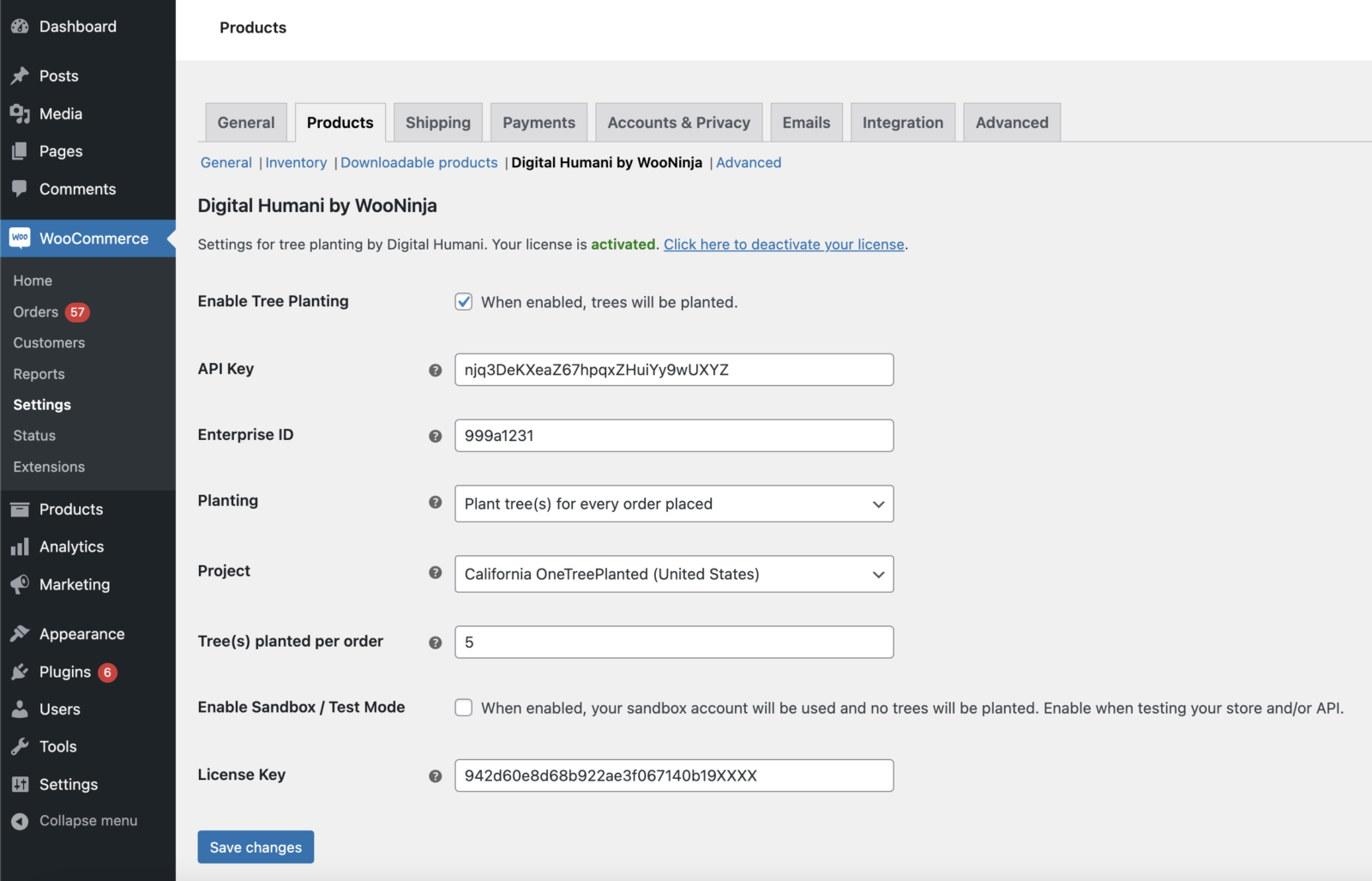
5. Enter your API Key and Enterprise ID

6. Enter the License Key from WooNinja (Check the email you received when you downloaded the plugin)

7. Click Save changes

8. You may need to click Activate Plugin at the top of the page (Optional)

Global Settings #

To access settings, open WooCommerce, click Settings, then Products and the Digital Humani by WooNinja sub-menu

Enable Tree Planting – When this box is checked, the plugin is active and will attempt to plant trees

API Key – Your API Key from Digital Humani

Enterprise ID – Your API Key from Digital Humani

Planting – You can toggle between automatic tree planting, or allowing a customer to opt-in at checkout.

Tree(s) planted per order – The total number of trees that should be planted with each order

Enable Sandbox / Test Mode – For developers, this allows you to test using the Digital Human Sandbox API

License Key – The license key from WooNinja to allow software updates. This is optional but highly recommended.

Product Settings #

Each product in WooCommerce will have a Digital Humani Setting. This allows you to plant additional trees on a per product basis, or you can elect to only plant trees for certain products.
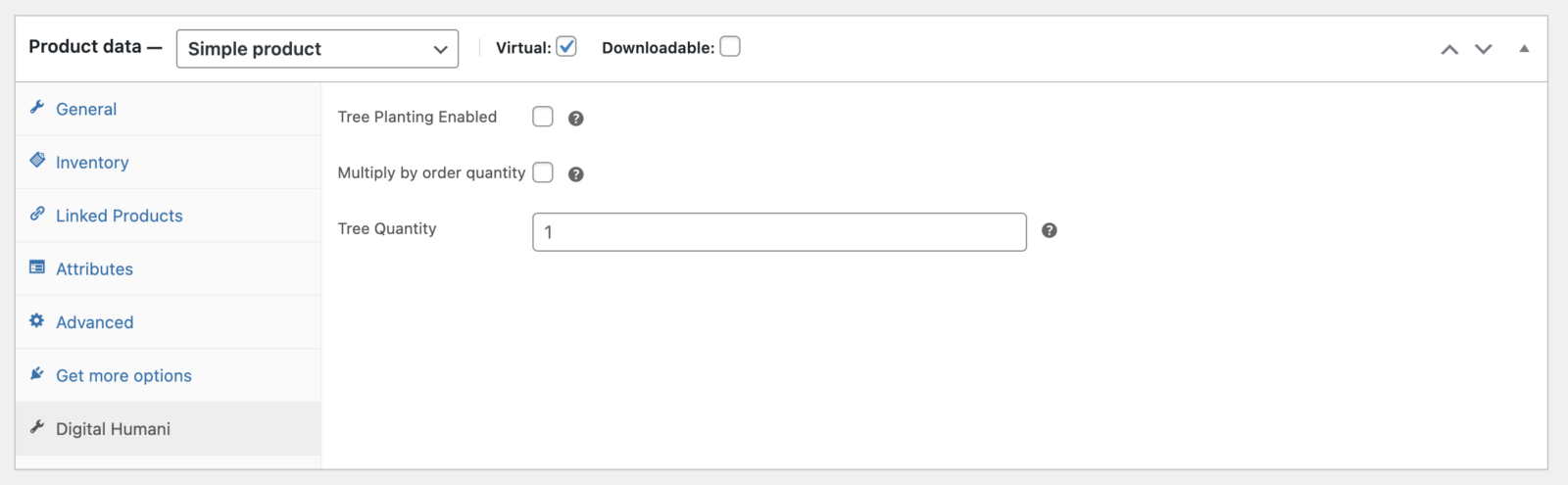
Tree Planting Enabled – When ticked, the product will have trees planted when purchased.

Multiple by Order Quantity – When enabled, the number of this product purchased will influence the total tree count.

Tree Quantity – The number of trees to plant per product

Example Configurations #

I want to plant a single tree for every order that is placed on my store

In Global settings, set the number of trees to one (or the amount you wish) and planting to Plant tree(s) for every order placed

I want to give my customers the option to opt-in to tree planting

In Global settings, simply set the number of trees to one (or the amount you wish) and planting to Customer can opt into tree planting at checkout

I want to plant an addition tree(s) for a specific product

Open the Product in WooCommerce and select the Digital Humani tab. Enable tree planting by checking the box and set the quantity as you wish. You can optionally multiply by the number of products in the cart.

Important: If you enable planting on a per product level, this is in addition to your global settings. For example, if you plant a tree to every order, and someone orders one product that plants two trees per purchase, the total planted trees for that order will be three e.g.

Global (1 Tree) + Product (2 Trees) = 3 Trees

Certificates #

Important: This feature must be enabled by Digital Humani on your account. Please contact them before enabling this feature.

In the Digital Humani settings, enable the checkbox for Certificates and click Save Changes

By default, this will send an email to the billing email of the order containing a PDF certificate generated by Digital Humani. This email will be set separately to the order billing email and can be edited in the same manner as other WooCommerce emails (We do not provide support for modifying this email, please review the documentation from WooCommerce or consult your developer)

Help & Support #

This plugin is provided without charge to assist the efforts of Digital Humani. If you would like to support the development of the plugin, you are welcome to make feature suggestions, report bugs or buy the WooNinja developers a coffee. For extended support queries, we kindly ask that you buy a coffee first by clicking here.

For questions related to billing and planting of trees, please contact Digital Humani directly.

Updated on March 28, 2023
Digital Humani by WooNinja (WordPress Plugin)Digital Humani by WooNinja (WordPress Plugin)
Table of Contents
  • Getting Started
  • Global Settings
  • Product Settings
  • Example Configurations
  • Certificates
  • Help & Support
  • Terms
  • Privacy
  • Documentation
  • Contact Us
  • Discount Codes
Copyright 2026 © WooNinja.com
  • Home
  • Thinkific
    • WooCommerce
    • Single Sign On (SSO)
    • Thinkific B2B Dashboard
    • WordPress Shortcodes
    • Groundhogg Automation
    • Learndash Migration Service
    • Uncanny Automator
    • WeChat & AliPay
    • Thinkific Funnels
  • Intercom
  • Groundhogg
    • Telegram Messenger
    • Simple Texting
    • WooCommerce Subscriptions
    • WooCommerce Bookings
    • WooCommerce Deposits
    • WooCommerce Memberships
    • Direct Mail & Thanks.io
    • Paid Membership Pro
    • Ultimate Member
    • Shopify
    • Restrict Content Pro
    • Thinkific
    • Mailgun
    • Hunter.io
    • Tawk.to
    • Passwordless Login
  • Contact
  • Buy Now
  • Login